
Automate lead follow-ups by sending pre-built messages and reminders based on actions taken. These automations keep deals moving forward and ensure no opportunity is forgotten.
Are you spending too much time managing leads, sending follow-up messages, updating customer records, and handling repetitive tasks? Manual processes can slow down your team, create inconsistent customer experiences, and cause valuable sales opportunities to slip through the cracks.
Our CRM workflow automation services help businesses streamline daily operations, improve lead management, and automate repetitive tasks. By creating structured workflows around your sales and marketing processes, we help your team respond to enquiries, manage customer interactions, and move opportunities through the sales pipeline more efficiently.
Whether you need automated lead assignment, follow-up reminders, customer onboarding, appointment notifications, or sales pipeline automation, we help design workflows that support your business goals.
Automate repetitive tasks. Improve follow-ups. Give your team more time to grow your business.
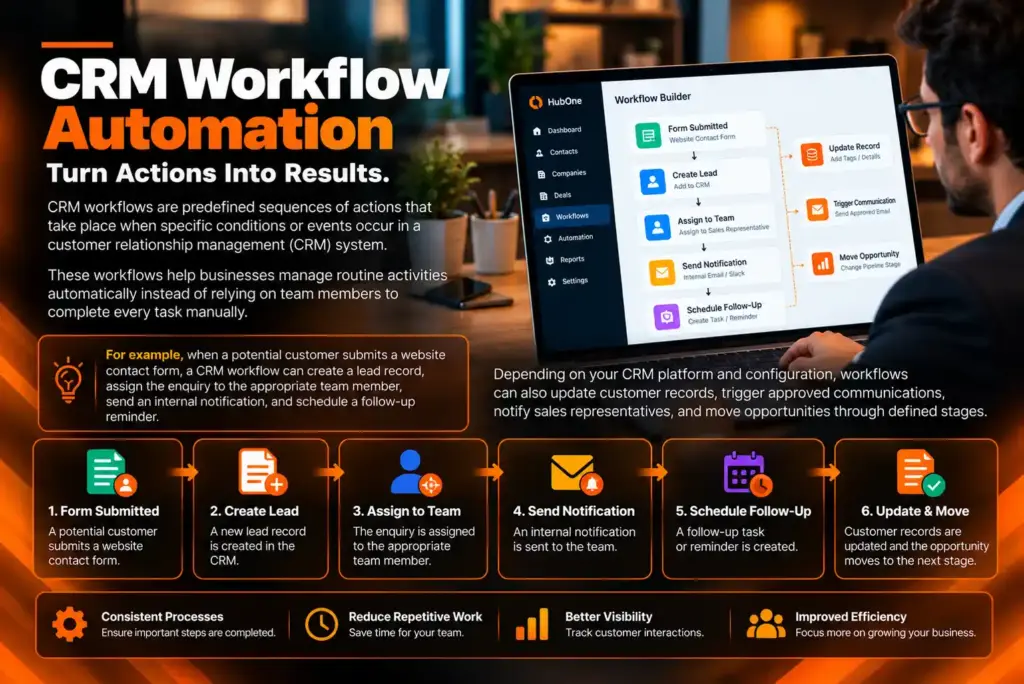
CRM workflows are predefined sequences of actions that take place when specific conditions or events occur in a customer relationship management (CRM) system.
These workflows help businesses manage routine activities automatically instead of relying on team members to complete every task manually.
For example, when a potential customer submits a website contact form, a CRM workflow can create a lead record, assign the enquiry to the appropriate team member, send an internal notification, and schedule a follow-up reminder.
Depending on your CRM platform and configuration, workflows can also update customer records, trigger approved communications, notify sales representatives, and move opportunities through defined stages.
CRM workflow automation helps create consistent processes, reduce repetitive work, and improve visibility into customer interactions.
Manual processes often become harder to manage as your business receives more enquiries and serves more customers. Without clear workflows, leads may remain unattended, follow-ups may be delayed, and team members may spend valuable time on administrative tasks.
CRM workflow automation helps address these challenges in several ways.
Save time: Automate repetitive administrative tasks so your team can focus on higher-value activities.
Improve lead response: Trigger notifications and follow-up tasks when new enquiries arrive.
Reduce human error: Standardize routine processes and reduce avoidable manual mistakes.
Create consistent customer experiences: Use defined workflows to ensure important steps are completed.
Improve team coordination: Assign responsibilities and notify the right people at the right time.
Increase sales visibility: Track how leads progress through your sales pipeline.
Support business growth: Build repeatable processes that can adapt as enquiry volumes increase.
Automation does not replace the need for good customer service or thoughtful communication. It helps your team deliver these consistently by making routine processes more organized.
When leads arrive from website forms, landing pages, advertising campaigns, or other connected sources, timely processing is essential.
We design workflows that organize incoming enquiries, create or update lead records, assign leads according to defined rules, and notify the responsible team members.
Where supported, assignment rules can consider factors such as service type, location, team availability, or lead ownership.
This helps reduce missed enquiries and creates a clearer process for handling new business opportunities.
Following up consistently can be challenging when your team manages multiple enquiries simultaneously. Automated workflows can create reminders, schedule tasks, or send approved communications based on specific events and timing rules.
For example, when a new lead enters your CRM, a workflow may create an immediate follow-up task and notify the assigned representative if the enquiry remains unattended.
Communication automation should respect customer preferences, consent requirements, and applicable laws. We configure follow-up processes according to your business needs and available platform features.
Sales pipeline workflows help move opportunities through your defined sales process while keeping records and responsibilities organized.
Depending on your CRM, automation can trigger actions when a lead becomes qualified, a meeting is booked, a proposal is sent, or a deal is marked as won or lost.
Possible actions include updating record fields, creating tasks, notifying sales managers, and generating follow-up reminders.
These workflows help your team identify stalled opportunities and maintain a more consistent sales process.
Missed appointments and forgotten bookings can disrupt daily operations. We help configure workflows that support appointment-related tasks through compatible CRM and booking integrations.
Depending on your setup, workflows may create appointment records, notify team members, send booking confirmations, and schedule reminders before an appointment.
Additional workflows can help manage cancellations, rescheduling requests, or post-appointment follow-ups where supported.
A structured onboarding process helps new customers understand what happens after they purchase a service or sign an agreement.
We help automate appropriate onboarding steps, such as assigning internal tasks, notifying the delivery team, updating customer status, and scheduling check-ins.
For service businesses and agencies, these workflows can create a more organized transition from sales to service delivery.
Maintaining customer relationships requires consistent communication and timely attention to customer needs.
Where your CRM supports these functions, we can create workflows for renewal reminders, follow-up tasks, inactive customer reviews, and relevant re-engagement campaigns.
These workflows help your team identify opportunities to reconnect with customers while ensuring communications remain relevant and appropriate.
Your team should not need to monitor every CRM record manually to identify the next action.
We configure supported workflows that notify the right people when important events occur. Examples include new lead notifications, overdue follow-up reminders, changes in deal status, and alerts for high-priority opportunities.
Automated task creation and clear ownership rules help reduce confusion and improve accountability across your team.
(513) 775-3224
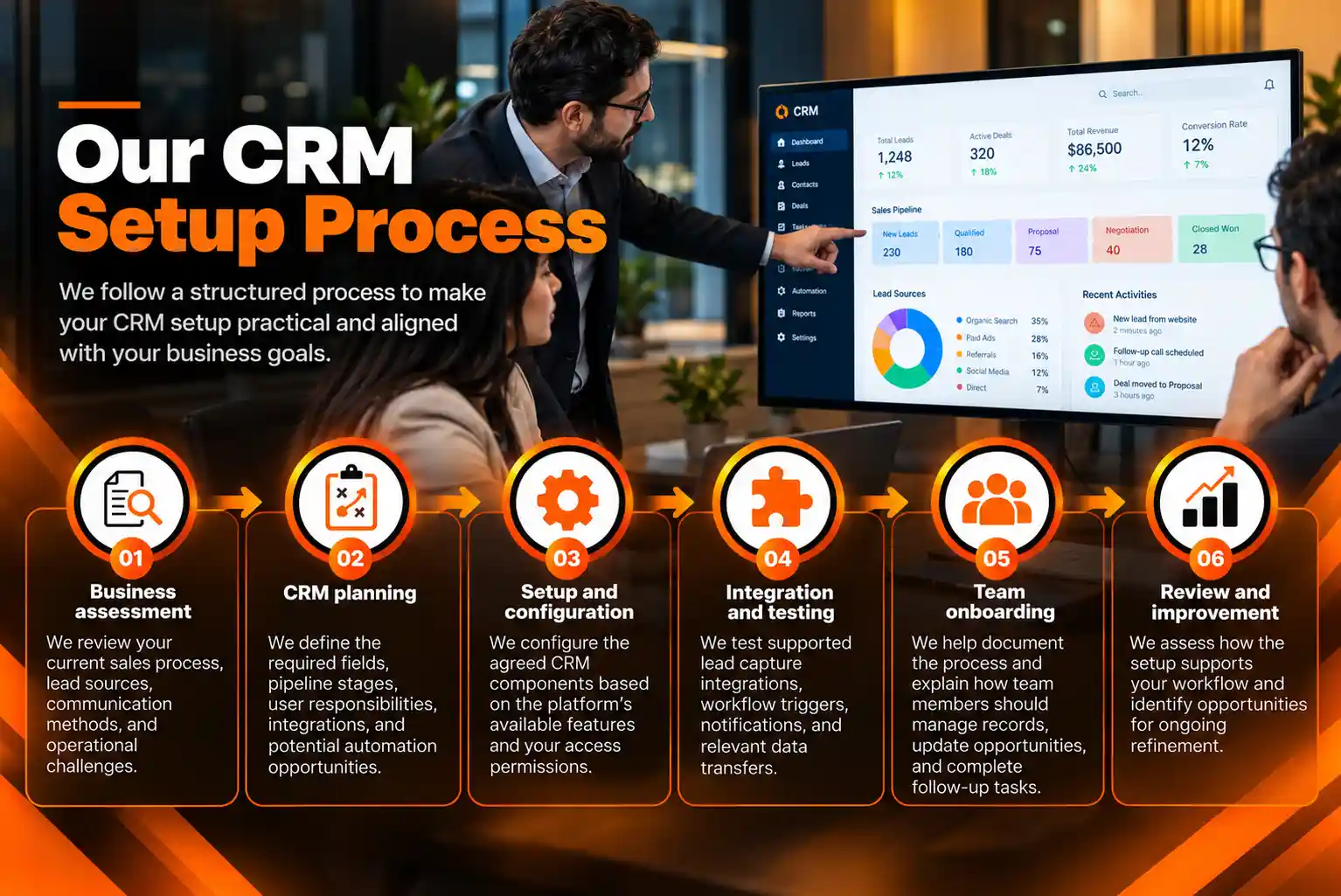
We follow a structured process to ensure your workflows solve real business problems and operate as intended.
Step 1: Business process analysis
We review your current sales, marketing, and customer management processes to identify repetitive tasks, delays, and opportunities for improvement.
Step 2: Workflow planning
We define the events that trigger automation, the conditions that must be met, the actions to perform, and any exceptions that require manual review.
Step 3: Workflow configuration
We build the agreed workflows using the features and integrations supported by your CRM platform.
Step 4: Testing and quality assurance
We test different scenarios to check triggers, conditions, notifications, task creation, and record updates. We also check for duplicate actions and unintended workflow loops.
Step 5: Documentation and team training
We document important workflow rules and explain how your team should manage automated processes, handle exceptions, and maintain accurate CRM records.
Step 6: Monitoring and optimization
We review workflow performance and identify opportunities to improve reliability, efficiency, and alignment with changing business requirements.
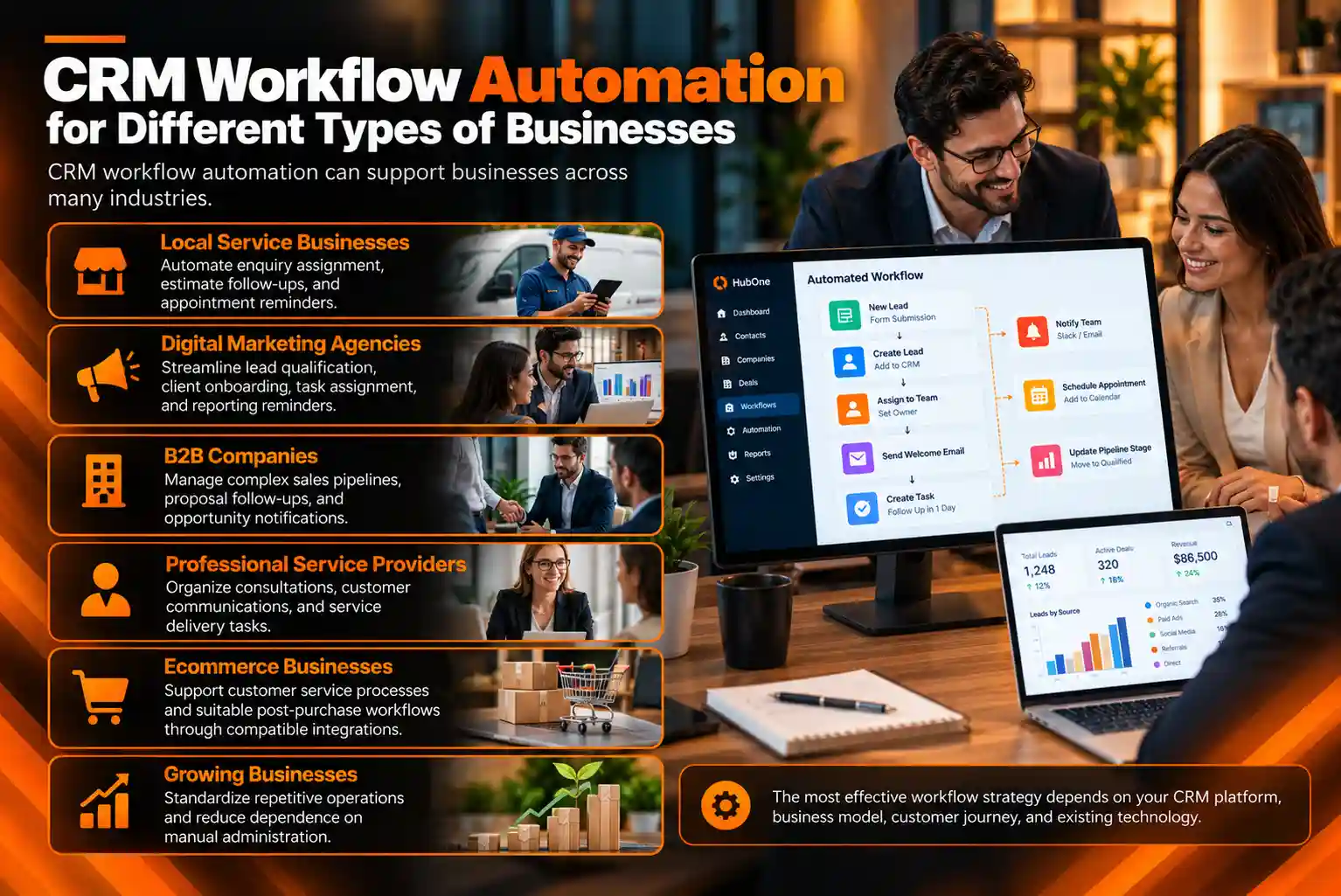
CRM workflow automation can support businesses across many industries.
Local service businesses: Automate enquiry assignment, estimate follow-ups, and appointment reminders.
Digital marketing agencies: Streamline lead qualification, client onboarding, task assignment, and reporting reminders.
B2B companies: Manage complex sales pipelines, proposal follow-ups, and opportunity notifications.
Professional service providers: Organize consultations, customer communications, and service delivery tasks.
Ecommerce businesses: Support customer service processes and suitable post-purchase workflows through compatible integrations.
Growing businesses: Standardize repetitive operations and reduce dependence on manual administration.
The most effective workflow strategy depends on your CRM platform, business model, customer journey, and existing technology.
We focus on building practical automation that supports your team’s daily work rather than adding unnecessary complexity.
Our approach includes business-focused workflow planning, customized automation rules, integration assessment, testing, clear documentation, and ongoing improvement recommendations.
We also consider data quality, access permissions, communication preferences, and privacy requirements when designing workflows.
Before implementation, we confirm which automations your CRM supports and identify any integrations or technical work needed to achieve your goals.
EBCG © copyright 2026. All rights reserved.